

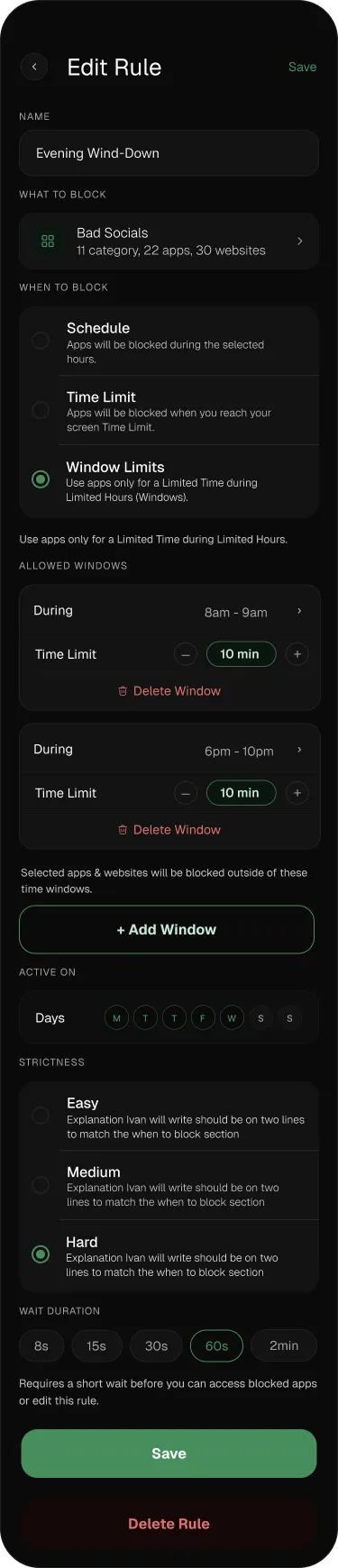
Blocking an app all day sounds clean, but it doesn’t suit everyone. Messages from family, a group chat for a project, a delivery update: some apps matter, just not all day. If a total block feels impossible, it usually gets switched off by Wednesday.
What a window is
A window is a stretch of the day when an app is allowed, with a time limit inside it. Outside the window, the app stays blocked. Inside it, you can open the app until your time for that window runs out.
A common setup is two windows a day:
- 12:30–13:30, ten minutes
- 19:00–20:00, ten minutes
Ten minutes is enough to read and reply. It isn’t enough to wander.
Why it works better than a total block
A window gives you something to look forward to, and something to stop at. You stop checking in between, because you know when the next window opens. Messages wait. Almost nothing needs an answer in the next five minutes.
It also keeps friends and colleagues from noticing a change. You still reply, just in batches.
Setting one up
Create a Window Limits rule and add the apps you want to allow, such as your messaging apps. Add each window with its start, end and time limit. Pick a strictness that matches how firm you want to be: Easy lets you skip, Medium adds a wait, Hard holds the line.
Adjusting over time
Start generous and tighten as the habit settles. Ten minutes can become five. A second window can become one. Because rule changes apply from the next day, you can adjust each evening without arguing with yourself in the moment.
Try this setup in Scrules.
Schedules, windows and Hard mode are all in the app.
Download on the App Store