The usual advice is to put your phone in another room. It works, but it isn’t always realistic. Your flashcards are on it. Your timer is on it. Your study group is on it. A better aim is a phone that stays useful, with the distractions taken away.
Block by category, then allow the useful ones
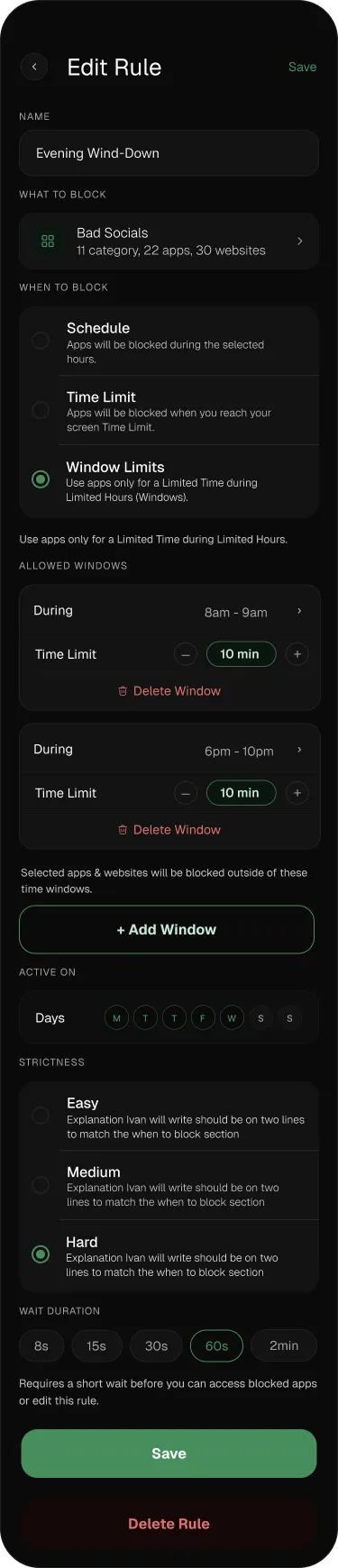
Start with a block list of the things that pull you away: social media, video, games, and the websites you’d reach for next. Add the categories as well as the individual apps, so a new app you download mid-revision is blocked too.
Then leave your study tools alone. Flashcards, notes, a timer, a dictionary: don’t add them, and they keep working.
Pick a schedule you can keep
Match the rule to your real study hours. A few focused blocks are easier to keep than an all-day ban. Between blocks, you get the phone back, which makes the blocks easier to accept.
Choose how firm to be
If you’re building the habit, Medium adds a short wait before a block lifts, which is often enough to break the reflex. If you know you’ll keep trying, Hard has no skips and no resets.
Keep messages possible
A window lets you open messaging apps at set times with a time limit, such as ten minutes at lunch and again in the evening. You stay reachable without living in the chat.
For true emergencies
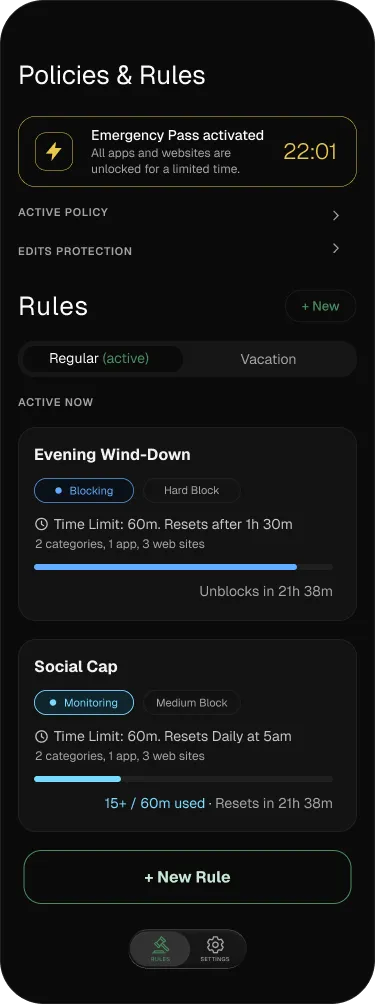
Studying shouldn’t stop you from being reached when something real happens. An Emergency Pass unlocks everything for a limited time, then your rules apply again on their own. Use it for real emergencies, not for “just one video”.
Putting it together
Your phone sits on the desk, face down. It tells the time, plays your timer, holds your cards. Everything else waits until the block ends.
Try this setup in Scrules.
Schedules, windows and Hard mode are all in the app.
Download on the App Store